【教程】安装抓包证书、root权安装CA证书
●方式一:
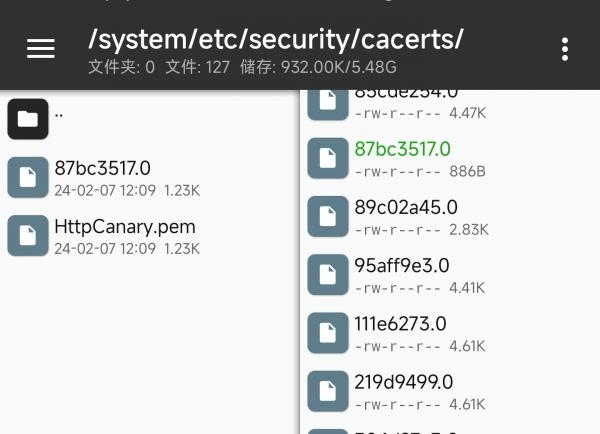
直接移动到 /system/etc/security/cacerts/ 中 xxxxx.0 文件为系统证书文件
ps:只对系统分区解锁,可以读写的情况下有用
●方式二:
安装有模块后,可在模块文件夹加入系统路径,把证书放入其中,则会映射到系统文件中
如:/data/adb/modules/xxxxxxz/ 中加入/system/etc/security/cacerts/
●方式三:
>>>先安装个人证书,(小米手机位于:设置→安全→更多安全设置→更多安全设置→加密与凭证→)
>>>安装好后可见:

>>>可见路径 /data/misc/user/0/cacerts-added/ 中有证书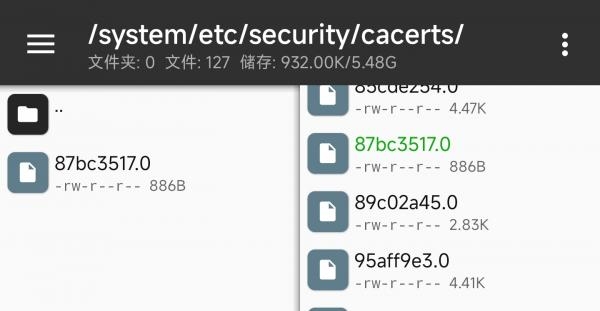
>>>>>root权限执行脚本即可:

→→脚本链接:
开源地址:GitHub地址
脚本备份地址:https://caiyun.139.com/m/i?0D5CJDHIs5cCp 提取码:CEr3
set -e # Fail on error

# Create a separate temp directory, to hold the current certificates
# Without this, when we add the mount we can't read the current certs anymore.
mkdir -p -m 700 /data/local/tmp/htk-ca-copy

# Copy out the existing certificates
if [ -d "/apex/com.android.conscrypt/cacerts" ]; then
    cp /apex/com.android.conscrypt/cacerts/* /data/local/tmp/htk-ca-copy/
else
    cp /system/etc/security/cacerts/* /data/local/tmp/htk-ca-copy/
fi

# Create the in-memory mount on top of the system certs folder
mount -t tmpfs tmpfs /system/etc/security/cacerts

# Copy the existing certs back into the tmpfs mount, so we keep trusting them
mv /data/local/tmp/htk-ca-copy/* /system/etc/security/cacerts/

# Copy our new cert in, so we trust that too
cp /data/misc/user/0/cacerts-added/* /system/etc/security/cacerts/

# Update the perms & selinux context labels, so everything is as readable as before
chown root:root /system/etc/security/cacerts/*
chmod 644 /system/etc/security/cacerts/*
chcon u:object_r:system_file:s0 /system/etc/security/cacerts/*

echo 'System cacerts setup completed'

# Deal with the APEX overrides in Android 14+, which need injecting into each namespace:
if [ -d "/apex/com.android.conscrypt/cacerts" ]; then
    echo 'Injecting certificates into APEX cacerts'

    # When the APEX manages cacerts, we need to mount them at that path too. We can't do
    # this globally as APEX mounts are namespaced per process, so we need to inject a
    # bind mount for this directory into every mount namespace.

    # First we get the Zygote process(es), which launch each app
    ZYGOTE_PID=$(pidof zygote || true)
    ZYGOTE64_PID=$(pidof zygote64 || true)
    Z_PIDS="$ZYGOTE_PID $ZYGOTE64_PID"
    # N.b. some devices appear to have both, some have >1 of each (!)

    # Apps inherit the Zygote's mounts at startup, so we inject here to ensure all newly
    # started apps will see these certs straight away:
    for Z_PID in 1 $Z_PIDS; do
        if [ -n "$Z_PID" ]; then
            nsenter --mount=/proc/$Z_PID/ns/mnt -- \
                /bin/mount --bind /system/etc/security/cacerts /apex/com.android.conscrypt/cacerts
        fi
    done

    echo 'Zygote APEX certificates remounted'

    # Then we inject the mount into all already running apps, so they see these certs immediately.

    # Get the PID of every process whose parent is one of the Zygotes:
    APP_PIDS=$(
        echo $Z_PIDS | \
        xargs -n1 ps -o 'PID' -P | \
        grep -v PID
    )

    # Inject into the mount namespace of each of those apps:
    for PID in $APP_PIDS; do
        nsenter --mount=/proc/$PID/ns/mnt -- \
            /bin/mount --bind /system/etc/security/cacerts /apex/com.android.conscrypt/cacerts
        echo "bind APEX to pid: $PID"
    done
    wait # Launched in parallel - wait for completion here

    echo "APEX certificates remounted for $(echo $APP_PIDS | wc -w) apps"
fi

# Delete the temp cert directory & this script itself
# rm -r /data/local/tmp/htk-ca-copy

echo "System cert successfully injected"
教程 2024-02-07 13:32:49 通过 网页 浏览(304)
共有0条评论!